It is amazing how much free time we have after the football season ends :-). My football season ended two weeks ago when the New England Patriots were eliminated (it still hurts – Next year will be different). I made good use of this additional time by taking a geekation that had been wanting to for a long time.
I decided to take a trip to Amazon’s SWF land. I have been hearing a lot about it, at work,in the community After all, it is on THE CLOUD.
With destination picked, I needed a theme to make the most of my stay there. I chose to build a very rudimentary digital asset management system. The idea is to touch upon the major moving parts for a digital asset management system and focus on the happy path. I eventually hope to evolve this into a reference implementation. I don’t expect anyone (including myself) to put this code in production. Just have some fun and learn.
I selected these cloud solutions to build my reference application on.
The idea is figure out how to stitch these cloud solutions together.
On the back of a paper napkin, the activity workflow to upload a video file into a digital asset management system could look like this:
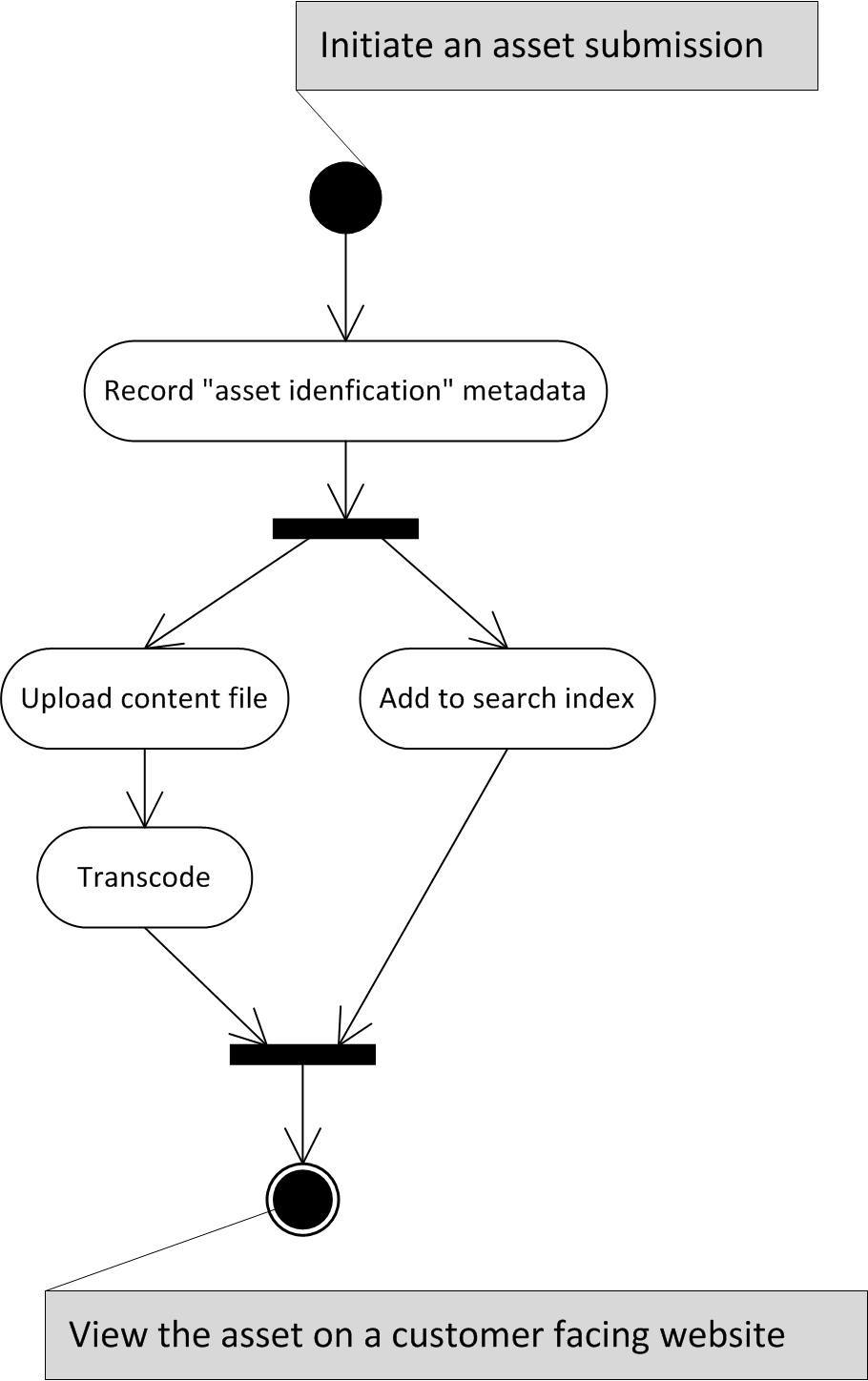
To implement the above workflow in the SWF framework, I needed to build three classes of applications:
- Activity Workers
- Workflow Deciders
- Workflow Triggers
Activity Worker
An Activity Worker is an application that hosts logic to perform an activity (in the above diagram). It pulls work from an SWF task queue (called task list), works on it and finally reports the result back to SWF.
- Typically, one Activity Worker does one Activity. This is ideal for several reasons.
- In a few rare cases, one worker can handle more than one activity.
Since workers in SWF worker solely on “pull” (asynchronous) model, three scalability options are available to us, viz.,
- Demand smoothening; a worker chooses work that matches its available capacity.
- Scale out; stand up more instances of workers as demand increases.
- Scale up; throw more hardware at a single worker.
A mentioned earlier, a worker pulls activity off task list in SWF.
- Typically, a one-to-one relationship exists between a task list and an activity type.
- Alternatively (but rarely),
- A task list can contain more than one activity type. A case where a single worker can handle more than one activity.
- A single activity type (not activity instance) can appear more than one task list. A case where activity instances need to be prioritized.
Workers typically, like I did, are implemented as daemon processes. However, there is nothing in the SWF architecture that prevents from deciders and workers being interactive application like web application or even console applications.
The activity workers I have in my application are:
- Upload Worker : Responsible for uploading the digital files into the DAM.
- Transcode Worker: Responsible for creating variation(s) for the uploaded digital file (Uses Encoding.com)
- Asset Management Worker : Responsible for recording the metadata of uploaded digital file.
- Asset Index Worker : Responsible for indexing the metadata in a search engine (Amazon CloudSearch)
To leverage all the benefits of SWF (asynchronous activities), we need to achieve the following in our design:
- We only assume the order in which activities are given to workers.
- We cannot assume the order in which activities will be completed (As one worker might be slower than the other)
- The activities on a task list should not have any dependency of each other. This will severely limit how we can scale our application.
- The workers should be idempotent.
Workflow Deciders
While workers do heavy lifting, deciders orchestrate the workers. They decide when an activity should be done. A decider also sets the policy for an activity that is enforced by SWF.
In many respects, deciders are like workers. They, like workers, pull decision tasks (created by SWF) from a task list, take decision, and report the result back to SWF.
Deciders can afford to be stateless. SWF, as part of the decision task request provides a workflow event log. By retracing the log the decider can figure out what should happen next. This type of decision-making could get tricky quite quickly, but that is the fun part.
I believe it is possible to scale-out the deciders, but we need to be extremely careful with our design. Imagine, two decider instances making a decision on the same workflow at the same time. Fortunately, SWF will give different workflow event log to both and workflow event logs are strictly sequential and append only. Now it is up to us to design the deciders to be idempotent.
I have two deciders:
- Single Submission Decider : A workflow to control the submission of a single digital file
- Bulk Submission Decider : A workflow to control a bulk submission. This piggy backs on the Single Submission Decider.
Workflow Triggers
Workflow triggering applications are usually consumer-facing applications that accept work and set the “workflow” ball rolling. Unlike workers and deciders, messages are pushed to these triggering applications.
I have one triggering application:
- Submission Management Service : A REST service that accept bulk submission requests and triggers the “Bulk Submission Workflow”
- Bulk Submission App : A command line application installed on the end user’s computer to submit digital assets. This consumes the Submission Management Service’s API.
What’s left for SWF to do?
Good question, right?
The right question to ask is “what we didn’t have to do build a distributed, scalable and synchronous digital asset management system”.
- Durable Task Queues
- Task Timeout
- Task Retries
- Workflow Traceability
- Policy based control of activities
Post Geekation Blues
This was good geekation. Why to do I think so? Because I already a have list of “things to check out” on my next break
- Enhance the reference implementation to handle unhappy paths
- Can the workflow logic be externalized and put in the hand of business users?
- Project the operating cost of this reference implementation in some hypothetical business settings.
 Geekation